> This is part 1 of 2 of the full documentation (pages 1–100 of 113).
> The content is paginated: fetch every part to see all of it.
> Next part: https://docs.frequencychain.org/llms-full.txt/1
> Page index: https://docs.frequencychain.org/llms.txt
# 1. Introduction to Frequency X Chain (FreCx) Developer Documentation
FreCx (Frequency ChainX) is a purpose built Layer 1 blockchain platform designed specifically for the renewable energy economy. FRECx provides a scalable, energy optimized infrastructure that enables the tokenization of renewable energy assets, decentralized coordination of physical infrastructure, and programmable financial mechanisms for sustainable markets. At its core, FreCx implements the Solid Split Proof of Stake (S2PoS) consensus mechanism, which is designed for long term economic sustainability, predictable emission dynamics, and strong network security at large scale participation. The network uses specialized node roles Cluster, Sync, and Vault nodes to deliver robust coordination, data integrity, and secure asset management while remaining compatible with evolving regulatory and compliance requirements
(FreCx) is designed to support decentralized applications, real-world infrastructure systems, and intelligent automation through integrated AI and data layers. It combines EVM compatibility, a role-based consensus architecture (S2PoS), and a deterministic economic model, enabling developers to build scalable and reliable applications that extend beyond traditional blockchain use cases.
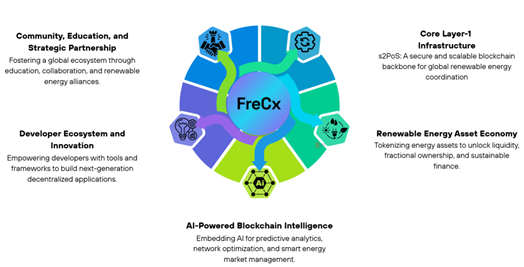
FreCx follows a structured strategic framework in which protocol infrastructure, renewable energy markets, developer innovation, and global partnerships evolve together.
# 1.1 Purpose of This Documentation
The purpose of this documentation is to provide a comprehensive, step-by-step guide for interacting with and building on the FreCx network.
This developer documentation is structured to serve both:
* Individuals with no or less prior experience in blockchain or Web3
* Experienced developers looking to build advanced decentralized systems
Unlike conventional documentation that assumes prior knowledge, this guide begins with foundational concepts and progressively introduces advanced topics, ensuring that developers can move from basic interaction to full-scale application development on FreCx.
It is designed to help developers:
* Understand how the FreCx blockchain operates
* Set up the required development environment
* Deploy and interact with smart contracts
* Integrate real-world data and AI systems
* Build decentralized applications across multiple sectors
Each section is written to ensure clarity and continuity, allowing readers to follow along without requiring external references.
# 1.2 What Makes FreCx Different for Developers
FreCx extends beyond a typical EVM-compatible blockchain by introducing additional infrastructure layers that developers can leverage directly within their applications.
At the core, FreCx provides a familiar environment for Ethereum developers, allowing the use of Solidity, Remix, Hardhat, and other standard tools. However, it enhances this environment with:
* A multi-layer node architecture (Cluster, Sync, Vault) that improves validation and security
* A deterministic reward and staking model, enabling predictable economic behaviour
* An Energy Data Layer, allowing integration of real-world energy data into smart contracts
* An AI-powered intelligence layer, enabling predictive and adaptive applications
* Cross-chain interoperability, allowing interaction with external ecosystems
This combination enables developers to build applications that are not only decentralized but also connected to real-world systems and capable of intelligent decision-making.
# 1.3 Development Approach
Developing on FreCx follows a structured progression:
1. Establish a wallet and connect to the network
2. Deploy and test smart contracts
3. Interact with contracts and applications
4. Integrate advanced features such as data layers and AI
5. Scale applications across subnets and cross-chain systems
This documentation follows the same progression, ensuring that developers can gradually build their understanding while maintaining a clear connection between concepts and implementation.
# 1.4 Who Should Use This Guide
This guide is intended for:
* Developers new to blockchain who want to understand and build decentralized applications
* Web2 developers transitioning into Web3
* Experienced blockchain developers exploring FreCx-specific capabilities
* Infrastructure providers and node operators
* Enterprises integrating blockchain into real-world systems
FreCx is designed as a developer-centric blockchain, where infrastructure, tools, and economic models are aligned to support real-world application development. By combining familiarity with innovation, it enables developers to build systems that are both technically robust and practically relevant.
With this foundation in place, the next step is to understand the Architecture of the protocol and how to develop and deploy smart contracts on the FreCx network.
# 2. Architecture Overview
FreCx is designed as a role-based Layer-1 blockchain architecture, where network responsibilities are distributed across specialized node types to ensure scalability, security, and deterministic execution. Unlike traditional blockchain systems where all nodes perform identical functions, FreCx introduces a structured separation of concerns, enabling optimized performance without compromising decentralization.
This architecture is built around three primary node roles:
* Cluster nodes (block production layer)
* Sync nodes (validation and state layer)
* Vault nodes (verification and integrity layer)
Together, these roles form a coordinated system where transaction processing, validation, and verification are handled independently but cohesively, ensuring high throughput and strong security guarantees.
Cluster nodes are responsible for aggregating transactions, ordering them, and producing blocks. These nodes operate under strict performance and staking requirements, ensuring that only high-quality infrastructure participates in block production.
Sync nodes maintain a complete copy of the blockchain state and independently validate every transaction and block. Their role ensures that all state transitions are deterministic and consistent across the network.
Vault nodes provide an additional layer of verification by performing cryptographic validation of blocks before they are finalized. This introduces redundancy in validation and significantly reduces the risk of invalid state transitions or malicious activity.
This layered approach ensures that execution is efficient and scalable, validation is decentralized and redundant and finality is secure and verifiable.
# 2.1 Transaction Lifecycle
Understanding how transactions move through the network is essential for developers.
When a user submits a transaction, it is first broadcast to the network and collected by Cluster nodes. These nodes include the transaction in a candidate block and propose it for validation.
Sync nodes then independently validate the block by executing all transactions and verifying state changes. Once validated, Vault nodes perform cryptographic checks to ensure integrity and correctness before the block is finalized.
This multi-stage validation process ensures that every transaction undergoes independent verification across multiple layers, reinforcing both security and consistency.
# 2.2 Deterministic Execution Model
FreCx enforces deterministic execution across all nodes, meaning that every node processing the same transaction will arrive at the same result.
This is achieved through consistent execution environments (EVM compatibility), strict validation rules and independent verification by Sync and Vault nodes.
For developers, this guarantees that smart contracts behave predictably, regardless of which node processes the transaction.
# 2.3 Scalability and Performance Design
The separation of roles within FreCx enables efficient scaling.
By limiting the number of Cluster nodes responsible for block production, the network achieves predictable coordination and low latency. At the same time, the larger set of Sync and Vault nodes ensures that validation remains decentralized and robust.
This design allows FreCx to maintain fast block times (\~1 second), high throughput and consistent performance under load.
# 2.4 Integration with Protocol Layers
The architecture is not isolated, it integrates directly with other layers of the FreCx ecosystem.
The Energy Data Layer feeds real-world data into the execution environment, enabling smart contracts to respond to external inputs. The AI layer analyzes network activity and optimizes performance, validator participation, and resource allocation.
These integrations ensure that FreCx operates not just as a blockchain, but as a multi-layer infrastructure system.
The FreCx architecture provides a foundation that balances performance, security, and extensibility. By structuring responsibilities across specialized node roles and integrating additional data and intelligence layers, the network enables developers to build applications that are both scalable and deeply connected to real-world systems.
# 3. Network Configuration
To interact with the FreCx blockchain, developers must understand how the network is configured and how to connect to it. Network configuration defines the parameters that govern how nodes communicate, how transactions are processed, and how applications interact with the blockchain.
Unlike traditional centralized systems where endpoints are abstracted away, blockchain networks require explicit configuration, including:
* RPC endpoints for communication
* Chain IDs for network identification
* environment selection (testnet vs mainnet)
Proper configuration ensures that applications interact with the correct network and that transactions are executed in the intended environment.
# 3.1 Testnet vs Mainnet Environments
FreCx provides two distinct environments for development and production.
The testnet is designed for experimentation and development. It allows developers to deploy contracts, test applications, and simulate interactions without using real economic value. Tokens on the testnet are intended for testing purposes only.
The mainnet represents the live production network where real transactions occur. Tokens on the mainnet carry economic value, and all operations are permanent and irreversible.
Developers should always begin development on the testnet and move to mainnet only after thorough testing and validation.
# 3.2 Chain ID and Network Identification
The Chain ID is a unique identifier assigned to each blockchain network. It ensures that transactions are sent to the correct network and prevents replay attacks across different chains.
When configuring tools such as MetaMask, Hardhat, or other frameworks, specifying the correct Chain ID is essential. An incorrect Chain ID will result in failed transactions or connection errors.
**For FreCx:**
* ***Mainnet Chain ID: 5296290***
* ***Testnet Chain ID: 5296291***
# 3.3 Understanding RPC Endpoints
An RPC (Remote Procedure Call) endpoint is the primary interface through which applications communicate with the blockchain.
When a developer deploys a smart contract, sends a transaction or queries blockchain data, the request is sent through an RPC endpoint to a node in the network.
FreCx provides public RPC endpoints for both testnet and mainnet environments.
For the mainnet:
* RPC URL: [https://rpc.frequencychain.org](https://rpc.frequencychain.org/)
* ***Chain ID: 5296290***
For the testnet:
* RPC URL: [https://testrpc.frequencychain.org](https://testrpc.frequencychain.org/)
* ***Chain ID: 5296291***
These endpoints enable developers to connect their applications, tools, and wallets directly to the FreCx network.
# 3.4 Explorer and Network Observability
FreCx provides explorer interfaces that allow developers to monitor and verify on-chain activity.
Through the explorer, developers can track transactions, verify smart contract deployments, inspect block details and monitor validator and reward activity
Explorer URLs:
* Mainnet: [https://frecxscan.com](https://frecxscan.com/)
* Testnet: [https://testnet.frecxscan.com](https://testnet.frecxscan.com/)
These tools are essential for debugging, auditing, and ensuring transparency in application behaviour.
## Explorer Images
Testnet Explorer Dashboard
Block details in the Testnet explorer
Transactions details from testnet explorer
# 3.5 Network Configuration in Development Tools
When using development frameworks such as Hardhat, Foundry, or Web3 libraries, the network configuration must be explicitly defined.
This includes:
* RPC endpoint
* Chain ID
* Account credentials (private key or wallet integration)
Proper configuration ensures that deployments, scripts, and interactions are executed correctly on the FreCx network.
Understanding network configuration is essential for any developer working with FreCx. It forms the foundation for all interactions, from deploying smart contracts to integrating applications and services.
With the architecture and network configuration established, developers are now equipped to begin building directly on FreCx using smart contracts and development tools.
# 4. Wallet and Network Access
Interacting with the FreCx blockchain requires a wallet, which acts as the primary interface between the user and the network. A wallet is not merely a storage mechanism for tokens, but a cryptographic identity layer that enables users to authenticate transactions, deploy smart contracts, and interact with decentralized applications.
For developers and users who are new to blockchain systems, it is important to understand that a wallet does not hold funds in a traditional sense. Instead, it manages a pair of cryptographic keys:
* a public address, which is used to receive assets and interact with applications
* a private key, which is used to authorize transactions and must remain strictly confidential
Every interaction with the FreCx network whether deploying a contract, sending tokens, or calling a function is executed through this wallet interface.
# 4.1 Installing a Web3 Wallet
To begin interacting with FreCx, a browser-based wallet such as MetaMask must be installed. MetaMask is widely adopted and fully compatible with EVM-based networks, including FreCx.
The installation process begins by navigating to the official MetaMask website. Users should ensure that they are accessing the correct URL to avoid malicious copies. From the download page, the appropriate browser extension (Chrome, Edge, or Firefox) can be selected and installed.
Once installed, the wallet becomes accessible through the browser toolbar, providing a persistent interface for blockchain interaction.
# 4.2 Creating a New Wallet
After installation, the wallet must be initialized. This involves generating a new cryptographic identity.
When MetaMask is opened for the first time, the user is prompted to create a new wallet. This process requires setting a secure password, which protects local access to the wallet on the device. However, the most critical step is the generation of the Secret Recovery Phrase.
The Secret Recovery Phrase is a sequence of words that represents the underlying private key. This phrase is the only method to recover access to the wallet in case of device loss or reset. It must be stored securely and never shared under any circumstances.
Once the phrase is recorded and confirmed, the wallet becomes fully functional, and a public address is generated. This address will be used for all interactions on the FreCx network.
Wallet creation screen
Secret Recovery Phrase display screen
Wallet dashboard after successful setup
# 4.3 Adding the FreCx Network
By default, MetaMask is configured to connect to the Ethereum network. To interact with FreCx, the network must be manually added using its configuration parameters.
This process begins by accessing the network selection dropdown within the wallet interface. From there, the user selects the option to add a custom network. The FreCx network details are then entered, including the RPC endpoint and Chain ID.
For the FreCx mainnet, the configuration is as follows:
* RPC URL: [https://rpc.frequencychain.org](https://rpc.frequencychain.org)
* *Chain ID: 5296290*
For the FreCx testnet, the configuration is:
* RPC URL: [https://testrpc.frequencychain.org](https://testrpc.frequencychain.org)
* *Chain ID: 5296291*
Once these details are saved, the wallet establishes a connection with the FreCx network. The user can now switch between networks and begin interacting with applications deployed on FreCx.
Add custom network form with FreCx details
Wallet connected to FreCx network
# 4.4 Acquiring FreCx Tokens
To perform transactions on the network, the wallet must hold FreCx tokens, which are used to pay for transaction fees and interact with smart contracts.
On the testnet, tokens can be obtained through designated distribution mechanisms (such as faucets or project-provided access). On the mainnet, tokens can be acquired through supported platforms such as FPay, decentralized exchanges, or bridging mechanisms.
Faucet for Testnet: [https://faucet.frecxscan.com/](https://faucet.frecxscan.com/)
Once tokens are received, they will appear in the wallet balance, enabling the user to begin interacting with the network.
Enter your Account address to receive the token and complete the captcha
Acknowledgement of transfer of 100 FreCx tokens
Wallet showing FreCx token balance
# 4.5 Verifying Transactions Using Explorer
Every transaction executed on FreCx can be verified through the network explorer. This provides transparency and allows users to track transaction status, block confirmations, and contract interactions.
Developers can use the explorer to debug transactions, verify contract deployments, and monitor network activity.
* Mainnet Explorer: [https://frecxscan.com/](https://frecxscan.com/)
* Testnet Explorer: [https://testnet.frecxscan.com/](https://testnet.frecxscan.com/)
By entering a wallet address or transaction hash, users can view detailed information about on-chain activity.
Explorer transaction details page
The wallet serves as the foundational interface for all interactions within the FreCx ecosystem. Proper setup and understanding of wallet functionality are essential for both developers and users, as every operation on the network — from deploying smart contracts to participating in staking — is executed through this interface.
With the wallet configured and connected to the FreCx network, developers can proceed to build, deploy, and interact with decentralized applications.
# 5. Smart Contract Development (Remix + Hardhat)
Smart contracts are the core building blocks of applications on the FreCx blockchain. A smart contract is a self-executing program that runs on the blockchain and automatically enforces rules and logic defined by the developer.
FreCx is fully compatible with the Ethereum Virtual Machine (EVM), which means that developers can write smart contracts using Solidity, the same programming language used in Ethereum. This compatibility ensures that existing tools, libraries, and development workflows can be used seamlessly.
This section provides a detailed guide to developing, deploying, and interacting with smart contracts using two primary tools:
* Remix IDE — a browser-based development environment
* Hardhat — a local development framework for advanced workflows
# 5.1 Understanding Smart Contracts
Before deployment, it is important to understand how smart contracts function.
A smart contract is deployed to the blockchain as code, has a permanent address, can store data and execute functions and cannot be modified once deployed.
When a user interacts with a contract, they are sending a transaction that triggers a function within that contract. This transaction is validated by the network and executed deterministically across all nodes.
Smart Contract Architecture
# 5.2 Developing and Deploying Using Remix IDE
Remix is a browser-based development tool that allows developers to write, compile, and deploy smart contracts without installing any additional software.
Accessing Remix
To begin, open the Remix IDE in your browser by navigating to:
[https://remix.frequencychain.org/](https://remix.frequencychain.org/)
Once loaded, the interface provides:
* a file explorer for managing contracts
* a code editor for writing Solidity code
* a compiler for generating bytecode
* a deployment panel for interacting with networks
# 5.3 Writing a Smart Contract
Create a new file in the Remix workspace and define a simple Solidity contract.
Example:
```
// SPDX-License-Identifier: MIT
pragma solidity ^0.8.0;
contract FreCxStorage {
uint256 public value;
function setValue(uint256 _value) public {
value = _value;
}
function getValue() public view returns (uint256) {
return value;
}
}
```
This contract demonstrates:
* state storage (value)
* a function to update state (setValue)
* a function to read state (getValue)
# 5.4 Compiling the Contract
After writing the contract, it must be compiled into bytecode.
In Remix:
1. Navigate to the Solidity Compiler tab
2. Select the appropriate compiler version
3. Click “Compile”
Compilation ensures that the contract is syntactically correct and ready for deployment.
# 5.5 Connecting to FreCx Network
To deploy the contract, Remix must be connected to your wallet.
1. Open the Deploy & Run Transactions tab
2. Select environment as Injected Provider (MetaMask)
3. Ensure MetaMask is connected to FreCx network
Remix will now use your wallet to sign and submit transactions.
# 5.6 Deploying the Contract
Once connected:
1. Select the contract
2. Click “Deploy”
3. Confirm transaction in MetaMask
After confirmation, the contract is deployed and assigned a blockchain address.
# 5.7 Interacting with the Contract
After deployment, Remix provides an interface to interact with the contract.
You can:
* call setValue() to update state
* call getValue() to read state
Each transaction will:
* require gas fees
* be recorded on-chain
* be visible in the explorer
# 5.8 Developing Using Hardhat
For advanced development, Hardhat provides a local development environment.
Setting Up Hardhat
*Install Node.js*, then initialize a project:
```
npm init -y
```
```
npm install --save-dev hardhat
```
```
npx hardhat
```
**Configuring FreCx Network**
```
Update hardhat.config.js:
module.exports = {
networks: {
frecx: {
url: "https://rpc.frequencychain.org",
chainId: 5296290,
accounts: ["YOUR_PRIVATE_KEY"]
}
},
solidity: "0.8.20"
};
```
# 5.9 Deploying Contracts via Script
Create a deployment script:
```
async function main() {
const Contract = await ethers.getContractFactory("FreCxStorage");
const contract = await Contract.deploy();
await contract.deployed();
console.log("Contract deployed to:", contract.address);
}
main();
```
Run deployment:
```
npx hardhat run scripts/deploy.js --network frecx
```
# 5.10 Verifying Contracts
After deployment, contracts can be verified on the FreCx explorer to ensure transparency.
* [https://frecxscan.com](https://frecxscan.com/)
* [https://testnet.frecxscan.com](https://testnet.frecxscan.com/)
This allows developers to confirm deployment, view transactions and share contract details
# 6. Interacting with Smart Contracts Using ethers.js and web3.js
Once a smart contract is deployed on the FreCx blockchain, interacting with it becomes the next critical step. While tools like Remix provide a visual interface for interacting with contracts, real-world applications require programmatic interaction through code. This is where libraries such as ethers.js and web3.js are used.
These libraries act as a bridge between applications (such as web interfaces or backend services) and the blockchain network. They allow developers to connect to the FreCx network through RPC endpoints, read data from deployed contracts, send transactions that modify contract state and sign transactions using a wallet.
Because FreCx is fully EVM-compatible, both ethers.js and web3.js can be used without any modification.
# 6.1 Establishing a Connection to the FreCx Network
Before interacting with a smart contract, an application must establish a connection to the blockchain network.
This is done using an RPC endpoint, which acts as the communication interface between the application and the FreCx network.
For the mainnet:
* RPC URL: [https://rpc.frequencychain.org](https://rpc.frequencychain.org/)
* ***Chain ID: 5296290***
For the testnet:
* RPC URL: [https://testrpc.frequencychain.org](https://testrpc.frequencychain.org/)
* ***Chain ID: 5296291***
# 6.1.1 Using ethers.js
To begin, ethers.js must be installed in your project environment.
Open your terminal and run:
```
npm install ethers
```
This command downloads and installs the ethers.js library into your project, making its functionality available in your code.
Once installed, a connection to the FreCx network can be created by initializing a provider. The provider is responsible for sending requests to the blockchain.
```
const { ethers } = require("ethers");
const provider = new ethers.JsonRpcProvider("https://rpc.frequencychain.org");
```
At this stage, the application is capable of reading data from the blockchain. However, to send transactions (such as updating contract state), a wallet must be connected.
```
const wallet = new ethers.Wallet("YOUR_PRIVATE_KEY", provider);
```
This wallet object is now capable of signing transactions and interacting with smart contracts on behalf of the user.
# 6.1.2 Using web3.js
An alternative approach uses web3.js, which provides similar functionality.
Install web3:
```
npm install web3
```
Create a connection:
```
const Web3 = require("web3");
const web3 = new Web3("https://rpc.frequencychain.org");
```
To enable transactions, a wallet must be added:
```
const account = web3.eth.accounts.privateKeyToAccount("YOUR_PRIVATE_KEY");
web3.eth.accounts.wallet.add(account);
```
This allows the application to sign and send transactions to the FreCx network.
# 7. Smart Contract Example : Wallet Authorization (Understanding msg. sender and Permissions
In real-world applications, not all users should be allowed to execute all functions. This example demonstrates how a contract can restrict access based on the caller’s wallet address.
Smart contract written in Remix
# 7.1 Writing and Deploying
Repeat the same steps used in the previous example to create a new file in Remix.
Paste:
```
// SPDX-License-Identifier: MIT
pragma solidity ^0.8.0;
contract WalletAuth {
address public owner;
constructor() {
owner = msg.sender;
}
function restrictedAction() public view returns (string memory) {
require(msg.sender == owner, "Not authorized");
return "Access granted";
}
}
```
Here:
* msg.sender represents the wallet calling the function
* the constructor sets the deployer as the owner
* access is restricted using require()
# 7.2 Executing the Contract
After deployment:
1. Click restrictedAction
2. If called using the same wallet that deployed the contract → success
3. If using another wallet → transaction fails
This demonstrates how access control is enforced.
Success message from wallet interaction
# 8. Smart contract Example: Payment Contract (Sending and Receiving FreCx)
This example demonstrates how contracts can receive and manage funds. This is essential for building payment systems, marketplaces, and financial applications.
# 8.1 Writing the Contract
This Solidity contract, called FreCxPayment, is a simple payment receiver that allows anyone to send cryptocurrency to it and keeps track of the total balance. The `pay()` function is marked as `payable`, meaning users can send funds when calling it, and it ensures that some amount is sent using a `require` check; once successful, it logs the transaction using an event (`PaymentReceived`) that records the sender and amount for transparency on the blockchain. The contract also includes a `getBalance()` function, which lets anyone view the total funds stored in the contract by returning its balance, but importantly, it does not include any way to withdraw or manage those funds, making it a basic one-way payment collection contract.
Create a new file and paste:
```
// SPDX-License-Identifier: MIT
pragma solidity ^0.8.0;
contract FreCxPayment {
event PaymentReceived(address sender, uint amount);
function pay() public payable {
require(msg.value > 0, "Send some FreCx");
emit PaymentReceived(msg.sender, msg.value);
}
function getBalance() public view returns (uint) {
return address(this).balance;
}
}
```
# 8.2 Sending a Payment
After deployment:
1. In Remix, locate the “Value” field (top of Deploy panel)
2. Enter an amount (e.g., 0.1 FreCx)
3. Select unit as “ether” (since FreCx follows same denomination model)
4. Click pay()
5. Confirm transaction in MetaMask
# 8.3 Verifying Payment
After execution:
1. Call getBalance() → shows contract balance
2. Check transaction in explorer
3. Confirm transferred amount
Smart contract development on FreCx combines the familiarity of Ethereum tools with the extended capabilities of the FreCx ecosystem. By leveraging Remix for rapid development and Hardhat for advanced workflows, developers can efficiently build, deploy, and manage decentralized applications.
With smart contract deployment established, the next step is to explore node infrastructure and deeper network participation, enabling developers to interact with FreCx at the protocol level.
# 9. FreCx Node Set up
Running a FreCx node requires preparing a server environment, installing dependencies, configuring the node software, and connecting it to the network. This section provides a step-by-step, command-level guide that can be followed even by users with minimal DevOps experience.
The instructions below assume a Linux-based environment (Ubuntu 20.04 or later), which is recommended for stability and compatibility.
# 9.1 Preparing the Server Environment
Before installing the FreCx node, the system must be updated, and essential tools must be installed.
*Updating System Packages*
Run the following command to update the package list:
```
sudo apt update
```
This command retrieves the latest list of available packages and versions.
To upgrade installed packages:
```
sudo apt upgrade -y
```
This ensures that all system packages are up to date.
*Installing Required Dependencies*
FreCx node setup typically requires basic tools such as Git, curl, and build utilities.
Install them using:
```
sudo apt install -y git curl wget build-essential
```
This installs:
* git for downloading source code
* curl and wget for network operations
* build-essential for compiling dependencies
Verify installation:
```
git --version
```
```
Installing Node.js (if required)
```
Some FreCx components or tooling may require Node.js.
```
curl -fsSL https://deb.nodesource.com/setup_18.x | sudo -E bash -
sudo apt install -y nodejs
```
Verify:
```
node -v
npm -v
```
*Installing Docker (Optional but Recommended)*
Docker simplifies node deployment and environment management.
```
sudo apt install -y docker.io
sudo systemctl start docker
sudo systemctl enable docker
```
Verify Docker:
```
docker --version
```
# 9.2 Downloading FreCx Node Software
To run a node, you must download the official FreCx node implementation.
*Cloning the Repository*
```
TBD
```
This command downloads the node source code from the official repository.
Navigate into the directory:
```
cd frecx-node
```
*Checking Repository Contents*
List files:
```
ls -la
```
This helps verify that all necessary files are present.
# 9.3 Building the Node (If Required)
Depending on implementation, the node may need to be compiled.
*Build Using Go (if Go-based)*
If the node is written in Go:
```
sudo apt install -y golang
```
Verify:
```
go version
```
Build the node:
```
go build -o frecx-node .
```
This creates an executable named frecx-node.
*Build Using Docker (Alternative)*
If Docker is used:
```
docker build -t frecx-node .
```
This creates a containerized version of the node.
# 9.4 Configuring the Node
Before starting, the node must be configured.
*Creating Configuration File*
```
nano config. json
```
Example configuration:
```
{
"network": "mainnet",
"rpc": "https://rpc.frequencychain.org",
"chainId": 5296290,
"nodeType": "sync",
"walletAddress": "YOUR_WALLET_ADDRESS"
}
```
Save the file:
* Press CTRL + O → Enter
* Press CTRL + X
# 9.5 Starting the Node
*Running the Node (Binary)*
```
./frecx-node --config config.json
```
This command:
* loads configuration
* connects to the network
* starts synchronization
*Running with Docker*
```
docker run -d \
--name frecx-node \
-v $(pwd)/config.json:/app/config.json \
frecx-node
```
# 9.6 Verifying Node Operation
Once started, logs will appear in the terminal.
Example:
```
tail -f logs/node.log
```
You should see:
* peer connections
* block synchronization
* transaction validation
# 9.7 Syncing the Blockchain
The node will begin syncing automatically.
Check sync status:
```
curl http://localhost:8545/status
```
This returns:
* current block
* sync progress
* network status
# 9.8 Running as a Background Service
To ensure continuous operation, run the node as a service.
```
Using systemd
```
Create service file:
```
sudo nano /etc/systemd/system/frecx-node.service
```
Add:
```
[Unit]
Description=FreCx Node
After=network.target
[Service]
ExecStart=/home/ubuntu/frecx-node/frecx-node --config /home/ubuntu/frecx-node/config.json
Restart=always
User=ubuntu
[Install]
WantedBy=multi-user.target
```
Enable and start:
```
sudo systemctl daemon-reexec
sudo systemctl daemon-reload
sudo systemctl enable frecx-node
sudo systemctl start frecx-node
```
Check status:
```
sudo systemctl status frecx-node
```
# 9.9 Staking Activation
Once the node is running, staking must be completed.
This is typically done via:
* wallet interface
* staking dApp
* CLI (if supported)
After staking:
* node becomes eligible
* participates in network
* starts earning rewards
This setup provides a fully operational FreCx node, capable of participating in validation and network operations. By following these steps, developers and operators can deploy nodes in a reproducible and scalable manner.
# 10. Staking, Rewards, and Economic Participation
The FreCx network enables economic participation through a role-based staking system, where token holders contribute to network operations by staking and optionally operating nodes. Unlike generalized staking models, FreCx ties staking directly to functional roles within the protocol, ensuring that rewards are aligned with real participation in validation, verification, and block production.
Participation is accessible through two approaches. Users may operate nodes directly by setting up infrastructure and staking tokens, or they may use the () staking platform, which abstracts infrastructure complexity and provides a guided interface for staking, activation, and reward tracking. In both cases, staking serves as the foundation for network security and reward eligibility.
# 10.1 Staking Model and Role Alignment
In FreCx, staking is not a one-size-fits-all mechanism. Each node role has a defined staking structure, designed to balance accessibility with responsibility.
The staking requirements are structured as follows:
* Cluster Nodes require a fixed stake of 1,000,000 FreCx per node, with additional nodes requiring multiples of the same amount.
* Sync Nodes require staking in multiples of 2,500 FreCx, allowing flexible scaling of participation.
* Vault Nodes require staking in multiples of 1,000 FreCx, enabling broader participation across a larger validator set
### Node Capacity Configuration
The FreCx mainnet enforces the following maximum participation limits:
* The network supports up to **10 Cluster nodes**, which are responsible for block production and consensus coordination.
* The network supports up to **150 Sync nodes**, which perform full-state validation and transaction verification.
* The network supports up to **16,000 Vault nodes**, which provide distributed verification, redundancy, and data integrity assurance.
This structure ensures that high-impact roles (Cluster) require significant commitment, validation roles (Sync, Vault) remain accessible and scalable, and participation can increase incrementally without rigid constraints
From a user perspective, this means staking is both modular and extensible, allowing gradual participation based on available capital and intended involvement.
# 10.2 Accessing the staking Platform
The staking platform provides a unified interface for staking and participation.
To begin, the user navigates to the staking platform using a web browser. Upon loading, the platform presents a connection interface requiring the user to link their wallet.
FrecX staking Platform: [https://validator.frequencychain.org/](https://validator.frequencychain.org/)
# 10.3 Connect the Wallet and complete the KYC
The connection process begins by selecting the wallet integration option, typically MetaMask. Upon selection, a secure prompt appears requesting permission to connect the wallet to the platform.
Once approved, the platform establishes a connection and retrieves:
* the wallet address
* available FreCx balance
* current staking status
**KYC** is essential because all staking operations are executed as blockchain transactions signed by the user’s wallet.
KYC Completion Screen
1. Provide your Full Name
2. Enter the email
3. Enter the Nationality
4. Organization is Optional
5. Choose the role(Cluster, Sync or Vault). This role cant be changed later. You may have to choose a different wallet address to stake in a different role.
6. Share the node location
7. Provide details about your technical expertise of handling the roles. Refer the whitepaper for more details on the requirements to be a node operator.
# 10.4 Selecting Node Type and Staking Amount
After connecting the wallet, the user is presented with staking options corresponding to node roles.
At this stage, the platform allows the user to choose between Sync and Vault participation (and Cluster where applicable). Once a role is selected, the user must enter the staking amount.
The platform enforces the required staking increments:
* For Sync nodes, the entered value must be a multiple of 2,500 FreCx. For example, 2,500, 5,000, 7,500, and so on.
* For Vault nodes, the entered value must be a multiple of 1,000 FreCx, such as 1,000, 2,000, or 10,000.
If an invalid amount is entered, the platform will reject the input or prevent the transaction from being executed.
This validation ensures that all staking aligns with protocol-defined thresholds.
# 10.5 Acquiring FreCx Tokens Using FSWAP
For users who do not currently hold FreCx tokens, the ecosystem provides an option to acquire FreCx tokens using Uniswap and native FSWAP.
The process begins by accessing the FSWAP platform and connecting the wallet. The user then selects the desired amount of FreCx tokens and get the required FRECx tokens by swapping with POL, USDC or USDT. This will help user to acquire FreCx(Polygon)
After acquiring the FreCx token in Polygon, users can bridge the tokens to FrecX chain using the FSWAP.
Once the swap is completed, the FrecX Polygon tokens are transferred directly to the user’s wallet, after which the users need to bridge the tokens to FreCx network.
Alternatively for Testnet , they can get the tokens from FrecX faucet -
# 10.6 Executing the Staking Transaction
Once a valid staking amount is entered, the user initiates the staking process by confirming the action within the platform interface.
This triggers a transaction request in the connected wallet. The wallet displays:
* the staking amount
* gas fee required
* total transaction cost
After reviewing the details, the user confirms the transaction. The transaction is then submitted to the FreCx network and processed by the protocol.
Upon confirmation, the stake is recorded on-chain and becomes part of the network’s staking registry.
# 10.7 Stake Activation and Participation Lifecycle
Following successful staking, the tokens enter an activation phase governed by epoch-based lifecycle rules.
During this phase:
* the stake is registered in the system
* eligibility for participation is established
* actual participation begins at the next activation boundary
This separation between staking and activation ensures coordinated participation across the network and prevents abrupt changes in validator composition.
Once activated:
* Sync nodes begin validating transactions and blocks
* Vault nodes begin cryptographic verification
* Cluster nodes (if applicable) participate in block production
# 10.8 Economic Participation Beyond Staking
While staking forms the foundation of economic participation, FreCx enables broader engagement across its ecosystem.
Users can deploy smart contracts, participate in decentralized finance, interact with energy marketplaces, and contribute to infrastructure networks. This ensures that the FreCx token is actively utilized across multiple layers of the ecosystem, reinforcing its role as a functional asset rather than a passive holding.
# 11. Reward Generation and Distribution
FreCx employs a deterministic reward model, where rewards are generated at the protocol level and distributed across node participants and ecosystem allocations.
Node rewards are structured as follows:
* Sync nodes receive a fixed reward per unit staked
* Vault nodes receive a smaller fixed reward per unit
* Cluster nodes receive a share of the remaining reward pool
An important characteristic of the system is its dynamic redistribution mechanism. When the number of active Sync or Vault nodes is below the expected capacity, their allocated rewards are not lost. Instead, the unutilized portion is redistributed within the node reward pool, increasing the effective reward for Cluster participation.
This ensures that:
* total rewards are always fully utilized
* network incentives remain balanced
* block production remains strongly incentivized
Rewards are accumulated continuously but are displayed and settled at defined intervals, which may not align with every block.
# 11.1 Tracking Rewards and Participation
The staking platform provides a real-time dashboard for monitoring participation.
Once staking is active, the user can view total staked amount, active node participation, accumulated rewards and reward settlement updates.
This visibility allows users to track performance and understand how rewards evolve over time.
# 11.2 Reward Allocation for Nodes
FreCx implements a **deterministic, priority-based reward distribution model**, where each block produces a fixed emission that is systematically allocated across node participants and ecosystem stakeholders.
At the protocol level, every block generates a:
**Base Block Reward of 1.05 FreCx**
This reward is divided into two primary components:
* a **Node Reward Pool (fixed allocation)**
* an **Ecosystem / Tokenomics Allocation (BPS-based distribution)**
This structure ensures predictable emission while allowing dynamic scaling of validator participation.
From the base reward of **1.05 FreCx**, a fixed portion is reserved:
**Node Reward Pool = 0.2285084 FreCx per block**
This pool is exclusively allocated to network participants, including Sync nodes, Vault nodes, and Cluster nodes.
### Sync Node Reward Allocation
The first allocation from the node pool is assigned to Sync nodes.
Sync rewards are calculated based on stake units, where 1 Sync unit = 2,500 FreCx staked
Each unit receives a fixed per-block reward: 0.000033 FreCx per Sync unit
The total Sync allocation per block is therefore:
Total Sync Reward = Number of Sync Units×0.000033
This ensures that Sync participation scales linearly with stake.
### Vault Node Reward Allocation
After Sync allocation, the next portion of the node pool is distributed to Vault nodes.
Vault rewards are also stake-based, where 1 Vault unit = 1,000 FreCx staked
Each unit receives 0.0000096 FreCx per Vault unit
The total Vault allocation per block is:
Total Vault Reward=Number of Vault Units×0.0000096
This provides a scalable verification layer aligned with participation.
### Cluster Node Reward Allocation (Residual Model)
After allocating rewards to Sync and Vault nodes, the remaining balance of the node reward pool is assigned to Cluster nodes.
Cluster Allocation=0.2285084−(Sync Reward+Vault Reward)
Each unit gets 0.0699584 per block that they produce. Unlike Sync and Vault nodes, cluster node rewards will be provided only for the nodes they produced.
This residual allocation model ensures:
* full utilization of the node reward pool
* dynamic adjustment based on network participation
* strong incentives for block production
Cluster rewards are distributed among active Cluster nodes, typically proportional to block production performance.
# 11.3 Reward Allocation for Ecosystem
After reserving the node reward pool, the remaining portion of the base reward is allocated to ecosystem and project wallets.
1.05−0.2285084=0.8214916 FreCx
This 0.8214916 FreCx per block is distributed using a Basis Points (BPS) model, ensuring deterministic and transparent allocation.
The distribution is defined as follows:
* **Foundation (10%)** : 0.08214916 FreCx per block, supporting long-term protocol sustainability and governance infrastructure.
* **Marketing and Development (21%)** : 0.172513236 FreCx per block, enabling ecosystem expansion, partnerships, and adoption.
* **SP Ecosystem (20%)** : 0.16429832 FreCx per block, supporting strategic programs and ecosystem growth initiatives.
* **Project Development (20%)** : 0.16429832 FreCx per block, funding ongoing technical and product development.
* **Founders and Team (15%)** : 0.12322374 FreCx per block, aligning incentives for core contributors.
* **Governance (5%)** : 0.04107458 FreCx per block, enabling decentralized governance participation.
* **Advisory (4%)** : 0.032859664 FreCx per block, supporting strategic advisory functions.
* **Developers (3%)** : 0.024644748 FreCx per block, incentivizing developer ecosystem contributions.
* **Liquidity Pool Ecosystem (2%)** : 0.016429832 FreCx per block, ensuring sufficient liquidity across supported markets.
The FreCx reward allocation model combines deterministic emission control with dynamic participation scaling, ensuring that network validators, infrastructure providers, and ecosystem stakeholders are all aligned within a single economic framework. By prioritizing validation layers, fully utilizing reward pools, and maintaining a structured ecosystem allocation, the model achieves both operational efficiency and long-term sustainability
# 11.4 Unstaking and Withdrawal
When a user decides to exit participation, the unstaking process must be initiated through the platform.
This involves submitting an unstake request, which triggers a cooldown period defined by the protocol. During this period, the stake remains locked to ensure network stability.
After the cooldown period is completed, the user can withdraw the tokens back to their wallet.
The FreCx staking model combines structured participation, deterministic rewards, and accessible onboarding to create a balanced economic system. By allowing users to engage at multiple levels—from simple staking through staking platform to full node operation—the network ensures inclusivity while maintaining strong security and performance guarantees.
# 12. Energy Data Layer Integration
The FreCx Energy Data Layer is a foundational component of the protocol that enables the integration of real-world energy data into blockchain execution. Unlike traditional blockchain systems that operate purely on digital inputs, FreCx introduces a structured mechanism through which external data—such as energy production, consumption, and environmental metrics—can be verified, recorded, and utilized within smart contracts.
This capability transforms the blockchain from a closed computational system into an open, data-aware infrastructure, where on-chain logic can respond to real-world conditions in a deterministic and verifiable manner.
The Energy Data Layer is particularly critical for applications such as:
* Renewable energy tokenization
* Carbon credit issuance and tracking
* EV charging and energy consumption systems
* Sustainability analytics and reporting
# 12.1 Architectural Positioning
The Energy Data Layer operates between external data sources and the blockchain execution environment. It is designed to ensure that all incoming data undergoes structured validation and verification before being committed on-chain.
The data flow can be understood as a multi-stage pipeline:
* data is generated from external systems such as IoT devices or enterprise platforms
* the data is processed and validated through oracle mechanisms
* verified data is anchored on-chain
* smart contracts consume the data for execution
This architecture ensures that data integrity is preserved while maintaining compatibility with deterministic blockchain execution.
# 12.2 Data Sources and Input Systems
Energy data originates from a variety of real-world systems. These include:
* smart meters measuring energy production or consumption
* solar and wind generation systems
* EV charging infrastructure
* enterprise energy management systems
These systems generate continuous streams of data, which must be standardized and validated before being used within blockchain applications.
From a developer perspective, these data sources are not directly connected to the blockchain. Instead, they interface through a structured ingestion layer that ensures consistency and reliability.
# 12.3 Oracle and Validation Layer
The integration of real-world data into FreCx is facilitated through an oracle layer. The oracle acts as an intermediary that:
* receives data from external systems
* validates the authenticity and format of the data
* ensures consistency across multiple inputs
* submits verified data to the blockchain
This process is critical because blockchain systems cannot inherently verify external data. The oracle layer introduces a controlled mechanism for bridging this gap while maintaining trust.
Validation may include:
* timestamp verification
* source authentication
* data consistency checks
* aggregation across multiple inputs
Only after these checks are completed is the data considered eligible for on-chain submission.
# 12.4 On-Chain Data Anchoring
Once validated, the data is committed to the blockchain in a structured format. This process is referred to as data anchoring, where a representation of the data—often in the form of hashes or structured records—is stored on-chain.
This ensures that:
* data becomes immutable once recorded
* it can be referenced by smart contracts
* historical data can be audited and verified
From a technical standpoint, this anchoring process enables developers to build contracts that rely on verifiable external inputs, rather than assumptions or manual updates.
# 12.5 Smart Contract Integration
Once data is available on-chain, it can be consumed directly by smart contracts. This allows developers to create applications where contract logic depends on real-world conditions.
For example, a smart contract may:
* issue tokens based on energy production levels
* calculate carbon credits based on verified data
* trigger payments when energy delivery conditions are met
From a development perspective, this integration follows standard Solidity patterns, where contracts read data from storage or interfaces exposed by the oracle layer.
# 12.6 Energy Data Consumption in Smart Contract
Below is a simplified example demonstrating how a smart contract can consume energy data.
```
// SPDX-License-Identifier: MIT
pragma solidity ^0.8.0;
contract EnergyDataConsumer {
uint256 public latestEnergyValue;
function updateEnergyData(uint256 _value) public {
latestEnergyValue = _value;
}
function getEnergyData() public view returns (uint256) {
return latestEnergyValue;
}
}
```
In a production environment, the updateEnergyData function would typically be restricted to trusted oracle addresses, ensuring that only verified data can be submitted.
# 12.7 Securing Data Inputs
To prevent unauthorized data injection, FreCx enforces controlled access to data submission mechanisms.
This is typically implemented through:
* restricted contract functions
* whitelisted oracle addresses
* signature-based verification
These controls ensure that only validated and authorized data sources can influence on-chain logic.
# 12.8 Integration with Applications
The Energy Data Layer is designed to integrate seamlessly with higher-level applications within the FreCx ecosystem.
Applications such as EnergyFit leverage this layer to:
* track energy generation and consumption
* calculate sustainability metrics
* enable trading of tokenized energy assets
Developers can build similar applications by integrating smart contracts with the data layer and designing logic that responds to real-world inputs.
# 12.9 Developer Workflow
From a developer’s perspective, integrating with the Energy Data Layer involves:
* identifying the required data inputs
* connecting to the oracle interface or data provider
* designing smart contracts that consume verified data
* testing interactions using simulated or testnet data
This workflow ensures that applications are both functional and aligned with real-world data flows.
The Energy Data Layer extends the capabilities of FreCx beyond traditional blockchain systems by enabling deterministic interaction with real-world data. By providing a structured and secure mechanism for data ingestion, validation, and consumption, it allows developers to build applications that are not only decentralized, but also deeply integrated with physical systems.
# 13. AI Integration and Intelligent Systems
FreCx integrates artificial intelligence as an operational layer within the protocol, enabling applications and infrastructure to move beyond static execution into adaptive, data-driven behavior. Unlike traditional blockchain systems where logic is entirely deterministic and predefined, FreCx introduces a complementary intelligence layer that analyzes data, predicts system behavior, and optimizes execution across the network.
This integration allows developers to build applications that respond not only to predefined inputs, but also to dynamic conditions derived from historical data, real-time signals, and predictive models.
The AI layer operates alongside the blockchain rather than replacing its deterministic nature. All final execution remains on-chain and verifiable, while AI systems act as decision-support and optimization mechanisms.
# 13.1 Architectural Role of AI in FreCx
The AI layer is positioned as an off-chain computation and intelligence framework that interacts with multiple components of the FreCx ecosystem.
It consumes data from:
* blockchain transaction activity
* node performance metrics
* energy data inputs
* application-level interactions
This data is processed through machine learning models and analytical systems. The output of these systems is then fed back into the blockchain through structured interfaces, enabling smart contracts and applications to act on intelligent insights.
This architecture ensures that:
* blockchain execution remains deterministic
* AI provides optimization without compromising trust
* data-driven decisions can be verified through on-chain actions
# 13.2 AI Use Cases Within the Network
The integration of AI enables multiple operational and application-level use cases.
At the infrastructure level, AI systems analyze validator behavior, transaction patterns, and network load to improve efficiency and detect anomalies. At the application level, AI enables predictive systems such as energy demand forecasting, dynamic pricing, and automated decision-making.
For developers, this means that applications can incorporate predictive analytics, automated execution triggers, intelligent resource allocation and anomaly detection and fraud prevention.
These capabilities extend the functionality of smart contracts by introducing context-aware decision making.
# 13.3 AI and Energy Data Integration
A key strength of FreCx lies in the combination of AI with the Energy Data Layer.
Energy data collected from real-world systems is processed by AI models to:
* forecast energy production and consumption
* optimize pricing for energy markets
* identify inefficiencies in energy usage
* calculate sustainability metrics
The results of these computations can be fed back into smart contracts, enabling automated actions such as adjusting token issuance based on production levels, triggering settlements in energy marketplaces and optimizing distribution of resources.
# 13.4 AI Integration Workflow for Developers
From a developer perspective, integrating AI into an application involves a structured workflow.
The process begins with identifying the data inputs required for the application. These inputs may include blockchain data, energy metrics, or user activity. The data is then processed through an AI system, which generates outputs such as predictions, classifications, or optimization parameters.
These outputs are then submitted to the blockchain through transactions or oracle mechanisms, allowing smart contracts to consume and act upon them.
This workflow ensures that AI remains an off-chain computation layer, while the blockchain serves as the source of truth for execution and state changes.
# 13.5 AI-Assisted Smart Contract Interaction
The following example demonstrates how an application might integrate AI outputs into smart contract execution.
```
const { ethers } = require("ethers");
const provider = new ethers.JsonRpcProvider("https://rpc.frequencychain.org");
const wallet = new ethers.Wallet("YOUR_PRIVATE_KEY", provider);
const contract = new ethers.Contract(contractAddress, abi, wallet);
// Example AI output (e.g., predicted energy demand)
const predictedValue = 120;
// Submit prediction to smart contract
await contract.updateEnergyData(predictedValue);
```
In this example, the AI system generates a prediction off-chain, and the result is submitted to the blockchain through a transaction. The smart contract can then use this value to trigger further logic.
# 13.6 Securing AI Inputs
Because AI operates off chain, it is important to ensure that only trusted data is introduced into the blockchain.
FreCx enforces this through controlled integration mechanisms such as restricted contract functions, whitelisted data providers and signature-based verification.
These controls ensure that AI outputs are authenticated before influencing on-chain execution.
# 13.7 AI APIs and Developer Access
FreCx provides interfaces that allow developers to integrate AI capabilities into their applications.
These interfaces may include:
* APIs for accessing processed data and predictions
* endpoints for submitting AI outputs to the blockchain
* integration points with decentralized compute infrastructure
Developers can use these APIs to build applications that combine blockchain execution with intelligent decision-making.
The integration of AI within FreCx transforms the network into an intelligent infrastructure layer, where data, computation, and execution are interconnected. By combining deterministic blockchain logic with adaptive intelligence, FreCx enables developers to build applications that are not only decentralized, but also responsive to real-world conditions and evolving system dynamics
# 14. Cross-Chain Interoperability using FSWAP
FreCx supports cross-chain interoperability using FSWAP through a structured bridging mechanism that enables the movement of assets between the FreCx network and external blockchain ecosystems. This capability is essential for extending liquidity, enabling multi-chain applications, and allowing users to interact with decentralized finance systems beyond the native network.
In the current implementation, FreCx is bridged with the Polygon network through a lock-and-mint / burn-and-release model, using a representation of the native token, FreCx(Polygon). This design ensures that asset movement across chains is both secure and supply-consistent, without introducing duplication or inflation.
# 14.1 Bridging Architecture
The FreCx bridging mechanism is designed to maintain a strict one-to-one correspondence between tokens on different chains. When tokens move from FreCx to Polygon, they are not transferred directly. Instead, they are locked on the source chain and represented on the destination chain through a native token.
The process involves two key operations:
* locking tokens on FreCx and minting FreCx on Polygon
* burning FreCx on Polygon and releasing FreCx on the main network
This ensures that the total circulating supply across chains remains consistent at all times.
# 14.2 Understanding FreCx (Polygon network)
FreCx in Polygon is a token deployed on the Polygon network that represents FreCx in a native form. It is fully backed by FreCx tokens locked on the FreCx network.
For every unit of FreCx minted on Polygon:
* an equivalent amount of FreCx is locked on the FreCx chain
Similarly, when FreCx is burned in Polygon,
* the corresponding FreCx is released back to the user
This mechanism ensures that FreCx(Polygon) maintains parity with FreCx and can be used seamlessly within the Polygon ecosystem.
# 14.3 Bridging from FreCx to Polygon (Lock and Mint)
The process of moving tokens from FreCx to Polygon begins with locking tokens on the FreCx network.
The user initiates this process through the bridge interface by connecting their wallet and selecting the amount of FreCx to transfer. Once the transaction is confirmed, the specified amount of FreCx is locked in a bridge smart contract on the FreCx network.
After the lock transaction is verified, the bridge system triggers a corresponding mint operation on the Polygon network. This results in the creation of FreCx tokens(Polygon), which are credited to the user’s wallet on Polygon.
This process ensures that the original tokens remain secured while their equivalent representation becomes available on another chain.
# 14.4 Bridging from Polygon to FreCx (Burn and Release)
To move assets back to the FreCx network, the reverse process is executed.
The user initiates a burn transaction on the Polygon network, specifying the amount of FreCx(Polygon) to convert. Once the transaction is confirmed, the FreCx(Polygon) tokens are permanently removed from circulation.
Following the burn operation, the bridge system verifies the transaction and triggers the release of the equivalent amount of FreCx tokens from the locked pool on the FreCx network. These tokens are then transferred back to the user’s wallet.
This ensures that:
* Tokens in Polygon are destroyed before native tokens are released in FrecX
* supply consistency is maintained across both chains
# 14.5 Developer Interaction with the Bridge
From a developer perspective, the bridge can be integrated into applications through smart contracts and frontend interfaces.
Applications may:
* detect user balances on both FreCx and Polygon
* trigger bridge transactions through UI workflows
* monitor bridge status using transaction hashes
* interact with WFreCx tokens as standard ERC-20 assets on Polygon
Because WFreCx follows standard token interfaces, it can be used within existing DeFi protocols on Polygon, enabling liquidity integration and broader ecosystem participation.
# 14.6 Security Considerations
The bridge mechanism is designed with strict controls to ensure asset safety.
These include:
* locking contracts that securely hold FreCx tokens
* controlled minting of WFreCx only upon verified lock events
* mandatory burn operations before token release
* transaction verification across both chains
These safeguards ensure that assets cannot be duplicated or manipulated during cross-chain transfers.
The FreCx bridging mechanism enables seamless asset movement across blockchain ecosystems while maintaining strict supply consistency and security guarantees. By leveraging the lock-and-mint / burn-and-release model and introducing WFreCx as a wrapped asset, FreCx extends its usability beyond its native network and into broader multi-chain environments.
# 15. APIs and SDK Integration
The FreCx network exposes its functionality to developers through a set of RPC interfaces, programmatic APIs, and SDK-compatible patterns, enabling applications to interact with the blockchain in a structured and scalable manner. These interfaces form the primary access layer through which developers can build applications, automate workflows, and integrate external systems with FreCx.
Unlike traditional APIs in centralized systems, blockchain interaction is inherently stateful and transaction-driven. Every operation—whether reading data or modifying state—must be routed through a node using defined protocols. FreCx provides these capabilities through standard JSON-RPC endpoints, along with compatibility for widely used development libraries such as ethers.js and web3.js.
This section explains how developers can interact with FreCx programmatically, construct application-level integrations, and build reusable SDK layers.
**RPC Interface and Network Communication**
At the core of FreCx integration lies the RPC interface, which allows applications to communicate directly with the blockchain network.
An RPC endpoint acts as a gateway to a FreCx node. Through this interface, developers can query blockchain state, retrieve account balances, read smart contract data and submit transactions.
FreCx provides publicly accessible RPC endpoints:
* Mainnet: [https://rpc.frequencychain.org](https://rpc.frequencychain.org)
* Testnet: [https://testrpc.frequencychain.org](https://testrpc.frequencychain.org)
To interact with these endpoints, developers send JSON-RPC requests over HTTP. Each request specifies a method, parameters, and an identifier.
# 15.1 Reading Blockchain Data Using RPC
A simple example of querying the latest block number using curl is shown below.
```
curl -X POST https://rpc.frequencychain.org \
-H "Content-Type: application/json" \
-d '{
"jsonrpc":"2.0",
"method":"eth_blockNumber",
"params":[],
"id":1
}'
```
This request sends a JSON-RPC call to the FreCx node, asking for the most recent block number. The response will contain the block number in hexadecimal format.
This type of interaction is useful for backend systems, monitoring tools, and lightweight integrations.
# 15.2 Sending Transactions via RPC
In addition to reading data, RPC endpoints allow submission of transactions. However, transactions must be signed before being sent to the network.
The general process involves creating a transaction payload, signing it using a private key and broadcasting it using eth\_sendRawTransaction.
Because manual transaction signing is complex, developers typically use libraries such as ethers.js or web3.js to handle this process.
# 15.3 Application Integration Using ethers.js
For most applications, ethers.js provides a convenient abstraction over raw RPC calls.
A typical integration begins by creating a provider and connecting a wallet.
```
const { ethers } = require("ethers");
const provider = new ethers.JsonRpcProvider("https://rpc.frequencychain.org");
const wallet = new ethers.Wallet("YOUR_PRIVATE_KEY", provider);
```
Once connected, the application can interact with contracts, send transactions, and query blockchain data.
For example, retrieving the wallet balance:
```
const balance = await provider.getBalance(wallet.address);
console.log("Balance:", ethers.formatEther(balance));
```
This demonstrates how RPC functionality is abstracted into simple method calls.
# 15.4 Building a Reusable SDK Layer
In production applications, developers often build an SDK layer to encapsulate blockchain interactions. This approach abstracts low-level logic and provides reusable functions across the application.
A basic SDK structure might include:
* network initialization
* contract interaction methods
* transaction helpers
* error handling
Below is a simplified example of a FreCx SDK module.
```
class FreCxSDK {
constructor(rpcUrl, privateKey) {
this.provider = new ethers.JsonRpcProvider(rpcUrl);
this.wallet = new ethers.Wallet(privateKey, this.provider);
}
async getBalance(address) {
const balance = await this.provider.getBalance(address);
return ethers.formatEther(balance);
}
async sendTransaction(to, amount) {
const tx = await this.wallet.sendTransaction({
to,
value: ethers.parseEther(amount)
});
return tx.hash;
}
}
module.exports = FreCxSDK;
```
This structure allows developers to reuse common functionality without repeating low-level logic.
# 15.5 Integrating Smart Contracts via APIs
Applications frequently interact with deployed smart contracts. This requires contract address, ABI (Application Binary Interface) and provider or wallet.
Example:
```
const contract = new ethers.Contract(contractAddress, abi, wallet);
const result = await contract.getValue();
await contract.setValue(50);
```
This enables seamless interaction between application logic and blockchain state.
# 15.6 Backend Integration Patterns
FreCx APIs can be integrated into backend systems for:
* processing transactions
* indexing blockchain data
* triggering automated workflows
* integrating with enterprise systems
A typical backend flow may involve:
* receiving a user request
* preparing a transaction
* signing it securely
* submitting it to the network
* tracking confirmation status
This allows blockchain functionality to be embedded into traditional applications.
---
[Next Page](https://docs.frequencychain.org/llms-full.txt/1)